
Cart
CaravansPlus.com.au

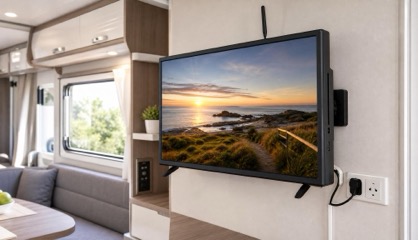
Sphere S9 Smart TV 24 inch · DVD, Soundbar & Smart Stick · 12V / 240V

$606.70$530
On backorder from supplier. Current ETA: 22nd of January. Order now to reserve next arrivals.

Delivery to Your Door

Postage Australia Wide

Postage

Enter your postcode for a delivery estimate.

Estimated Arrival

Check arrival using your postcode.

Not Sure This Is the Right Part?

Show us a photo or model number. We’ll help you check before you buy.

Our Recommendation Promise

Buy the part we recommend for your setup. If we get it wrong, we’ll cover return postage and delivery of the correct replacement.

Description

The Sphere S9 24-inch caravan TV combines a Full HD display (1920 x 1080), an inbuilt DVD player and a four-speaker 4 x 10 W soundbar. The soundbar builds on the S8 range with deeper bass, clear highs and fuller mids, without needing a separate soundbar.

The included Google-licensed Smart Stick runs Google TV for streaming apps. Streaming requires an internet-connected Wi-Fi network, and an active Google account is required for Smart Stick setup. The inbuilt DVD player lets you watch discs without an internet connection.

Designed for RV travel, the S9 has vibration-resistant construction and includes a 240V power adaptor and a 3m 12V car adaptor.

Features

  • Full HD LED Display - Crystal-clear 1920 x 1080 resolution for sharp visuals
  • Inbuilt DVD Player - Enjoy your classic movies on the go
  • Inbuilt 4-Speaker Soundbar - Enhanced 4 x 10W audio with deep bass and clear highs, perfect for RV spaces
  • Google-Licensed Smart Stick - Access popular streaming apps for a complete entertainment experience
  • Vibration-Resistant Design - Built to withstand the rigours of RV travel
  • 1 year warranty.

Specifications

  • Manufacturer Part Number: 900-05474
  • Brand: Sphere
  • Barcode: 2605S924TVDVDSB0074
  • Resolution: 1920 x 1080
  • Screen Size: 24 inch
  • Audio Output: 4 x 10 W
  • Power Input: 12 V / 240 V (240 V adaptor included)
  • Power Consumption: 48 W (on), 0.5 W (standby)
  • Dimensions with stand (W x D x H): 542 mm x 110 mm x 377 mm
  • VESA Mount: 100 mm x 100 mm
  • Weight (TV only): 3.6 kg
  • Supplied: Google-licensed Smart Stick, TV remote control and Smart Stick remote control with batteries, 12 V cigarette plug supply, 240 V plugpack and removable desktop stand
  • Included AV adaptors: Mini Composite (AV) and Mini Component (YPbPr) cables
  • Inputs: HDMI x 2 (1 used for Smart Stick), USB x 2 (1 used for Smart Stick), Mini Component (YPbPr) x 1, Mini Composite (AV) x 1 and antenna x 1
  • Outputs: Coaxial digital x 1, Headphones/Aux x 1 and RCA audio x 1
  • Ventilation clearance: Allow 100 mm between the TV and other appliances or built-in cabinet walls
  • Shipping Weight: 5.84 Kgs.
  • Shipping Dimensions: 46 cm x 62 cm x 13 cm.

Further Information

Our Comments

When setting up the Smart TV stick you will be prompted to set up the remote to control TV functions (volume/power etc.). You will need to select "LG" as the TV brand (as Sphere uses the same codes). For full step-by-step instructions, see the linked PDF.

Community Photos

Check This Part With Us

Sphere S9 Smart TV - 24 inch - DVD, Soundbar & Smart Stick - 12V / 240V

Ask Us. Buy With Confidence.

Ask us before ordering. If you buy the part we confirm for your setup and our recommendation is wrong, we’ll cover return postage and delivery of the correct replacement.

If we can’t supply a suitable replacement, we’ll refund the part.

We’ll explain any difference in the replacement part’s price before arranging the swap.

The promise applies to the setup and details we checked. If we can’t confirm suitability, we’ll say so before you buy. This is additional to your existing consumer rights.

Added to Cart

Checkout
Sub-Total:
Postage and delivery timing are confirmed at checkout.
Postage options shown at Checkout.
Edit CartCheckout

Combine & Save

Combining items in one order may reduce postage compared with separate orders.

  1. Add your items to the cart

    Check postage for everything together.

  2. Enter your delivery postcode

    See a postage price based on your items and location.

You’ll see the postage price before you place your order.